Tenant Information
SysTrack Administrators can access the Tenant Information page to see the following tenant information:
-
Tenant ID
-
Cloud ID
-
Release Version
-
System Count
-
Licenses
-
Expiration Date
Manage Tenant Invitations
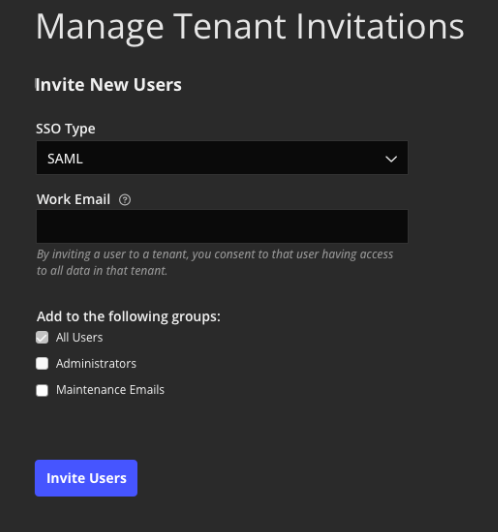
Use the Manage Tenant Invitations dialog box to invite new users to your tenant and delete outstanding invitations.
CLOUD ONLY: 10.7 - 10.9
-
Complete the following information:
-
SSO Type - Select either SAML or Azure B2C.
If SSO SAML is not configured, this option is disabled until the tenant is configured.
-
Work Email - This must be the email address associated with your identity provider. You can add multiple email addresses using a comma to separate. For example: email1@domain.com,email2@domain.com
New users are added to the All Users group by default. You can add the user to any additional groups that are listed.
-
-
Click Invite Users to send invitation.
On This Page